A micro-ear could soon help scientists eavesdrop on tiny events just like microscopes make them visible
Initially, researchers will use it to snoop on cells as they go about their daily business.
It may allow researchers to listen to how a drug disrupts micro-organisms, in the same way as a mechanic might listen to a car's engine to find a fault.
A team from three UK institutions are building the device, which they hope will become standard lab equipment.
Institutions involved include the Universities of Glasgow and Oxford as well as the National Institute of Medical Research at Mill Hill.
Force feedback
The micro-ear is based upon modifying an established technology that uses laser light to create so-called optical tweezers.These are already used to accurately measure tiny forces.
They work by suspending very small glass or plastic beads in a beam of laser light. Measuring the movement of these beads as they are jostled by tiny objects allows measurements of tiny forces that operate at molecular scales.
"We are now using the sensitivity afforded by the optical tweezer as a very sensitive microphone," said Professor Jon Cooper from the University of Glasgow, who is heading the micro-ear project.
"The optical tweezer can measure or manipulate at piconewton forces," said Professor Cooper. A piconewton is a millionth of the force that a grain of salt exerts when resting on a tabletop.
While many researchers use single beams of laser light to trap single beads, the micro-ear team hopes to use several arranged in a ring that will be able to surround and "listen to" an object of interest.
"We can look at a number of objects and watch them wobble," said Prof Miles Padgett. "A wobbling object is like a diaphragm on a microphone."
As such, said Professor Padgett, the wobble can be measured and used to turn the wobbles in the fluid surrounding the subject into sound giving an ear to events on the tiniest of scales.
By surrounding an object, said Professor Padgett, it should be easier to work out whether what that object does is the result of its own actions or something else.
A high-speed camera watches the motion of the ring of beads to determine the source of the motion.
Prof Padgett said work on refining the basic elements of what would become the eventual micro-ear was going well.
"We can trap and hold the beads and can connect the output to a speaker so we can hear them vibrating," he said.
In addition, he said, the team use tiny etched dishes, like a Victorian ear trumpet, to help focus the movements in the fluid surrounding an object and make them easier to pick up.
Already the team has been able to listen to Brownian motion - the restless jostling of the atoms and molecules in a fluid
Drug trials
Once the device is completed, a team led by Dr Richard Berry, a physicist at the University of Oxford, plans to use it to eavesdrop on flagella - the tiny motor that many bacteria such as E. coli use to move themselves around.
"Because this tech is so new and these guys are exploring what's possible the flagellar motor will be a very good test for the technology," said Dr Berry.
Currently, the movement of flagella are studied by sticking tiny beads to them and watching them whip around with a high-speed camera.
The beads are different to those used in the optical tweezers.
To complicate the process further, scientists must genetically engineer the bacteria to allow them to stick the beads on their tails.
"We have to make them specifically sticky to what we want to stick to them," said Dr Berry. "There's a biological step which can be very hit and miss."
This also means that the bacteria do not necessarily behave in the same way as natural organisms.
"We work on extremely genetically engineered subjects, nothing like you would find in the world," he said
The micro-ear might mean it is possible to use wild bacteria and many of them to get a much better understanding of what they do.
If the work with bacteria is successful the team is also planning to look at other micro-organisms.
One candidate could be the human trypanosome parasite which moves in the blood using a different sort of flagellar motor.
The parasite is behind sleeping sickness that affects up to 500,000 people a year in sub-Saharan Africa.
By listening to this motor, it may be possible to better understand how it works and ultimately investigate the action of new medicines that might stop its motor.
"Its truly exploratory in that we expect and hope we will hear something interesting but we really don't know," said Dr Berry.
Source: BBC Click
Sunday, February 28, 2010
Friday, February 26, 2010
Explore Google
You have used Google for search and Gmail for e-mail. Of course, you would have also used Picasa (photos) and GTalk (chat). But many are not aware that Google has a service called Latitude, which uses GPS to track one's friends.
If you have used Gmail, Picasa, Orkut, Docs and Google Talk, and you think you have explored almost all of Google's services, you are wide off the mark.
Even within a specific service such as Gmail, there are features the existence of which many don't know. Many are not even aware that Gmail has a Labs option that allows you to tweak the email client. This is apart from the general Google Labs that has experimental services such as Transliteration and Fast Flip. There are also country-specific Labs, such as the one for India.
Do you know that if you store an event in Google Calendar, it can alert you by an SMS at the right time — free of cost?
Talking of SMS, Google India has an excellent SMS service. This service offers details of train services (including fares), stock quotes, flight status, definition, weather, currency conversion, etc — for the price of a normal SMS. All you have to do is to send an SMS with the correct keyword (for a list of keywords, send ‘Help') to 9-77-33-00000.
If you want the gold price, you need to send ‘Price Gold' to 9-77-33-00000. You will get the reply in minutes. If you want the sleeper class fare for train number 1018 from Bangalore to Mumbai, send ‘train fare 1018 Bangalore to Mumbai for SL'.
If you have used Google's Indic Transliteration service, there is good news for you. There is a downloadable ‘Transliteration IME'. After you download and install it in your computer, you can type in any of the 14 Indian languages supported directly in any application, Word, for example.
So, the next time you use Google, just explore.
If you have used Gmail, Picasa, Orkut, Docs and Google Talk, and you think you have explored almost all of Google's services, you are wide off the mark.
Even within a specific service such as Gmail, there are features the existence of which many don't know. Many are not even aware that Gmail has a Labs option that allows you to tweak the email client. This is apart from the general Google Labs that has experimental services such as Transliteration and Fast Flip. There are also country-specific Labs, such as the one for India.
Do you know that if you store an event in Google Calendar, it can alert you by an SMS at the right time — free of cost?
Talking of SMS, Google India has an excellent SMS service. This service offers details of train services (including fares), stock quotes, flight status, definition, weather, currency conversion, etc — for the price of a normal SMS. All you have to do is to send an SMS with the correct keyword (for a list of keywords, send ‘Help') to 9-77-33-00000.
If you want the gold price, you need to send ‘Price Gold' to 9-77-33-00000. You will get the reply in minutes. If you want the sleeper class fare for train number 1018 from Bangalore to Mumbai, send ‘train fare 1018 Bangalore to Mumbai for SL'.
If you have used Google's Indic Transliteration service, there is good news for you. There is a downloadable ‘Transliteration IME'. After you download and install it in your computer, you can type in any of the 14 Indian languages supported directly in any application, Word, for example.
So, the next time you use Google, just explore.
Tuesday, February 23, 2010
DynamicBooks to customize books
DuMacmillan one of the largest publishers of trade and textbooks, is introducing software called DynamicBooks, which will allow college instructors to edit digital editions of textbooks and customize them for their individual classes.
Professors will be able to reorganize or delete chapters;upload course syllabusses,notes,videos,pictures,and graphs.;
In August,Macmillan plans to start selling 100 tites through DynamicBooks.
Students will be able to buy the ebooks at dynamicbooks.com,in college bookstores and through CourseSmart, a joint venture among five publishers that sells e-textbooks.
Source: DynamicBooks.com
Professors will be able to reorganize or delete chapters;upload course syllabusses,notes,videos,pictures,and graphs.;
In August,Macmillan plans to start selling 100 tites through DynamicBooks.
Students will be able to buy the ebooks at dynamicbooks.com,in college bookstores and through CourseSmart, a joint venture among five publishers that sells e-textbooks.
Source: DynamicBooks.com
Monday, February 22, 2010
Clothing could be used to power iPods and mobile phones
Clothing capable of storing electricity like batteries could be used to power iPods and mobile phones in the future.
Batteries are included as clothing promises to charge up gadgets
Engineers at Stanford University have found that they can turn fabrics and ordinary paper into lightweight batteries simply by coating them in ink laced with microscopic tubes of carbon.
The tubes, known as single-walled carbon nanotubes, when fixed onto fabrics such as cotton were found to be highly efficient at storing energy while still remaining flexible and stretchable like normal fabric.
Dr Yi Cui, from the department of materials science and engineering at Stanford University, in California, believes such materials could be used to create wearable batteries that can charge up portable devices such as mobile phones and MP3 players while on the move.
Paper coated in the conductive ink could also create new forms of moving displays for walls and powerful lightweight batteries.
Source: telegraph
Batteries are included as clothing promises to charge up gadgets
Engineers at Stanford University have found that they can turn fabrics and ordinary paper into lightweight batteries simply by coating them in ink laced with microscopic tubes of carbon.
The tubes, known as single-walled carbon nanotubes, when fixed onto fabrics such as cotton were found to be highly efficient at storing energy while still remaining flexible and stretchable like normal fabric.
Dr Yi Cui, from the department of materials science and engineering at Stanford University, in California, believes such materials could be used to create wearable batteries that can charge up portable devices such as mobile phones and MP3 players while on the move.
Paper coated in the conductive ink could also create new forms of moving displays for walls and powerful lightweight batteries.
Source: telegraph
Friday, February 19, 2010
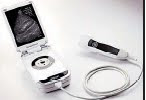
Portable ultrasound scanner
A portable ultrasound scanner of the size of a large mobile phone which,
medics claim, would help speed up diagnosis for emergency patients has been
launched in Europe and North America
The developer of the 5,000 pounds machine, G E Healthcare, says it is not designed as an alternative to traditional scanners but to offer a fast diagnosis and enable early treatment under emergency conditions.
The Vscan device can be used to take images of the heart and other parts of the body of the patients, who are
 away from a hospital — like at home or on military operations,“Telegraph”reported”.
medics claim, would help speed up diagnosis for emergency patients has been
launched in Europe and North America
The developer of the 5,000 pounds machine, G E Healthcare, says it is not designed as an alternative to traditional scanners but to offer a fast diagnosis and enable early treatment under emergency conditions.
The Vscan device can be used to take images of the heart and other parts of the body of the patients, who are

Thursday, February 18, 2010
Viewing the Mouse Tracks
If you’ve ever wondered about the flow of your mouse around your computer screen, a free downloadable application, called “mouse pointer track,” can help you follow these esoteric movements and turn them into a fascinating blur between art and information.
The simple application was developed by Anatoly Zenkov, a Russian graphic designer and programmer, and has been downloaded tens of thousands of times since he first released it in late January this year.
The software runs on any Macintosh or Windows computer and tracks every movement and click of your mouse.
Mr. Zenkov explained in an interview that the project began as a simple attempt to create something visually interesting with computer code. “It was just for fun,” Mr. Zenkov said. “It was meant to be an experiment for me, and then I saw the interest from so many other people, so I decided to share it for free on the Internet.”
As you can see from the images on Mr. Zenkov’s Flickr page, he has been tracking different mouse movements in different application settings.
The images at the top and bottom of this post were made by tracking my mouse movements for 30 minutes, during which time I was writing this blog post and surfing the Web.
The simple application was developed by Anatoly Zenkov, a Russian graphic designer and programmer, and has been downloaded tens of thousands of times since he first released it in late January this year.
The software runs on any Macintosh or Windows computer and tracks every movement and click of your mouse.
Mr. Zenkov explained in an interview that the project began as a simple attempt to create something visually interesting with computer code. “It was just for fun,” Mr. Zenkov said. “It was meant to be an experiment for me, and then I saw the interest from so many other people, so I decided to share it for free on the Internet.”
As you can see from the images on Mr. Zenkov’s Flickr page, he has been tracking different mouse movements in different application settings.
The images at the top and bottom of this post were made by tracking my mouse movements for 30 minutes, during which time I was writing this blog post and surfing the Web.
Wednesday, February 17, 2010
Microsoft Outlook to Facebook and MySpace Integration
Microsoft Outlook has become a lot more social through new partnerships with Facebook and MySpace and an existing one with LinkedIn.
Microsoft announced Outlook Social Connector, a new Office 2010 feature that hooks up social feeds into the Outlook inbox. The initial partner for the program was LinkedIn whose business connections, alerts, and messages would integrate directly with Outlook.
Now that integration has gone live.
Outlook users can now download LinkedIn for Outlook and transform their desktop inboxes into their hub for all things LinkedIn.
Microsoft announced Outlook Social Connector, a new Office 2010 feature that hooks up social feeds into the Outlook inbox. The initial partner for the program was LinkedIn whose business connections, alerts, and messages would integrate directly with Outlook.
Now that integration has gone live.
Outlook users can now download LinkedIn for Outlook and transform their desktop inboxes into their hub for all things LinkedIn.
Symbian Operating Systems Takes the Open Road
The most popular smartphone operating system, Symbian, announced a move towards open source in 2008, and has now completed the task. This means that anyone will be able to modify the Symbian source code, develop it, and use it for any purpose. What will be the impact of this bold move? The Symbian Foundation believes it will attract new developers to work on the system and help speed up the pace of improvement. It will increase both the speed of evolution, and the rate of innovation of the platform.
Symbian may be the world’s most popular smart phone operating system, but it has been losing the publicity battle, with Google’s Android operating system and Apple’s iPhone dominating recent headlines. So was this a marketing move to capture mindshare? Read BBC article titled Symbian phone operating system goes open source to find out.
Symbian may be the world’s most popular smart phone operating system, but it has been losing the publicity battle, with Google’s Android operating system and Apple’s iPhone dominating recent headlines. So was this a marketing move to capture mindshare? Read BBC article titled Symbian phone operating system goes open source to find out.
Monday, February 15, 2010
Ten Tips For Staying Safe On Facebook
1. Think about who you add It's not all about the numbers of friends. Remember when you accept a friend request you provide your new friend with access to lots of information about you. This includes, posts, photographs, messages and all the background information that you write about yourself. You can delete friends at any time, so perhaps it's time to refresh your list and think about who you really want accessing your information.
2. Check your settings Recently, Facebook changed the default privacy setting to share information publicly. It's worth spending some time to go through your settings and adjust where necessary; you may be sharing more than you intended. You even have the option to add 'limited profiles' for those people that you may not want accessing your personal information. It's up to you how you want to use these settings so it's definitely worth having a look to create a profile that's right for you!
3. Why are you on Facebook? Ask yourself what you want to achieve with your profile. Is it just to share photos, or keep in touch with people, or even to share links and updates of your activities? Sometimes it's better to cut down what you show on your profile; this includes signing up to applications which also take a lot of your data. You can always add or remove options as you go, so if your needs change, so should your profile.
4. Be smart about your password Try not to use the same passwords on all of your accounts. It's also important to be mindful of where you are sending your updates and the types of security questions you set.
5. Be aware of where you sign in from Check that the computer that you sign in from doesn't store your email address and password. It seems simple but often it's easy to accidentally choose it to 'remember you'. Make sure you have the appropriate privacy settings on your browser.
6. Be careful what you say Make sure that what you say in status updates and comments is something that you would be comfortable seeing on the front page of a newspaper. Once you post it, anyone that sees it can copy and post it elsewhere, or take action based on it. Do you really want everyone to know that you will be all alone at home tonight or away next week?
7. Watch out for Phishing Attacks Over the past year, there have been many attempts to get users to give up their login and passwords by tricking them with fake emails from Facebook. Never select any email links asking you to click to reset your password. Always go directly to Facebook - if there is a problem, Facebook will notify you on site. Installing and using an up-to-date complete protection solution on your PC, like AVG Internet Security, will also safeguard you against spam and phishing attacks.
8. Take immediate action If friends start receiving spam from you or status updates appear that you didn't make, your account may have been compromised. If you think this has happened, immediately change your password. If you can't log in to your account, go to the Help link at the bottom of any Facebook page and click on Security to notify Facebook about your account.
9. Protect your mobile device. Be mindful about who might have access to your mobile phone. Many phones today have apps that connect you into many social networking sites such as Facebook. Therefore, if you use these apps, make sure you log out of them when you are no longer using them.
10. Monitor suspicious activity Watch out for suspicious activity on your Wall, News Feed and Facebook Inbox. Never, ever click on suspicious links. They can often look enticing, e.g. "Hey come look at my charity cycling pictures on my site." Before you click, look closely! Does the site look authentic? If in doubt, don't click on it.
2. Check your settings Recently, Facebook changed the default privacy setting to share information publicly. It's worth spending some time to go through your settings and adjust where necessary; you may be sharing more than you intended. You even have the option to add 'limited profiles' for those people that you may not want accessing your personal information. It's up to you how you want to use these settings so it's definitely worth having a look to create a profile that's right for you!
3. Why are you on Facebook? Ask yourself what you want to achieve with your profile. Is it just to share photos, or keep in touch with people, or even to share links and updates of your activities? Sometimes it's better to cut down what you show on your profile; this includes signing up to applications which also take a lot of your data. You can always add or remove options as you go, so if your needs change, so should your profile.
4. Be smart about your password Try not to use the same passwords on all of your accounts. It's also important to be mindful of where you are sending your updates and the types of security questions you set.
5. Be aware of where you sign in from Check that the computer that you sign in from doesn't store your email address and password. It seems simple but often it's easy to accidentally choose it to 'remember you'. Make sure you have the appropriate privacy settings on your browser.
6. Be careful what you say Make sure that what you say in status updates and comments is something that you would be comfortable seeing on the front page of a newspaper. Once you post it, anyone that sees it can copy and post it elsewhere, or take action based on it. Do you really want everyone to know that you will be all alone at home tonight or away next week?
7. Watch out for Phishing Attacks Over the past year, there have been many attempts to get users to give up their login and passwords by tricking them with fake emails from Facebook. Never select any email links asking you to click to reset your password. Always go directly to Facebook - if there is a problem, Facebook will notify you on site. Installing and using an up-to-date complete protection solution on your PC, like AVG Internet Security, will also safeguard you against spam and phishing attacks.
8. Take immediate action If friends start receiving spam from you or status updates appear that you didn't make, your account may have been compromised. If you think this has happened, immediately change your password. If you can't log in to your account, go to the Help link at the bottom of any Facebook page and click on Security to notify Facebook about your account.
9. Protect your mobile device. Be mindful about who might have access to your mobile phone. Many phones today have apps that connect you into many social networking sites such as Facebook. Therefore, if you use these apps, make sure you log out of them when you are no longer using them.
10. Monitor suspicious activity Watch out for suspicious activity on your Wall, News Feed and Facebook Inbox. Never, ever click on suspicious links. They can often look enticing, e.g. "Hey come look at my charity cycling pictures on my site." Before you click, look closely! Does the site look authentic? If in doubt, don't click on it.
Thursday, February 11, 2010
Google's EMail as WebFinger
Google enabled the next generation of the UNIX like finger command - WebFinger - for all Gmail accounts. WebFinger provides users with a standardized and decentralized way of sharing their profile and identity information online
Google announced that the company has now enabled WebFinger fall all Google accounts with public profiles.
Making Your Email Address More Useful
You can think of WebFinger as an email-centric cousin of OpenID. While OpenID associates your identity with a URL, WebFinger links your identity to your email address. WebFinger can store metadata about your account and make it publicly accessible. This data can include your public profile data, information about other services that are used by this email address, a URL to your avatar, or - if you choose so - a declaration that this address doesn't have any metadata associated with it. The WebFinger metadata can also point to an alternative identity provider, which can be an OpenID server.
Currently, there are not a lot of user-facing projects that expose this data, but you can find a small demo service written by Google engineer DeWitt Clinton here.
Adding Value to Google Profiles
With Buzz, Google already put a lot of emphasis on Google Profiles and today's announcement increases the value of these profiles even more. It's important to note, though, that WebFinger is an open and free protocol, so any email service and identity provider can implement it. You can find more detailed information about the WebFinger protocol here.
Google announced that the company has now enabled WebFinger fall all Google accounts with public profiles.
Making Your Email Address More Useful
You can think of WebFinger as an email-centric cousin of OpenID. While OpenID associates your identity with a URL, WebFinger links your identity to your email address. WebFinger can store metadata about your account and make it publicly accessible. This data can include your public profile data, information about other services that are used by this email address, a URL to your avatar, or - if you choose so - a declaration that this address doesn't have any metadata associated with it. The WebFinger metadata can also point to an alternative identity provider, which can be an OpenID server.
Currently, there are not a lot of user-facing projects that expose this data, but you can find a small demo service written by Google engineer DeWitt Clinton here.
Adding Value to Google Profiles
With Buzz, Google already put a lot of emphasis on Google Profiles and today's announcement increases the value of these profiles even more. It's important to note, though, that WebFinger is an open and free protocol, so any email service and identity provider can implement it. You can find more detailed information about the WebFinger protocol here.
Wednesday, February 10, 2010
How to find IMEI number of mobile phone
IMEI stands for “The International Mobile Equipment Identity”. It is a unique identification number of every mobile phone. It helps mobile companies identify valid subscribers and the type of mobile phone equipment being used. Incase of mobile phone theft or lose, you can request mobile company to disable specific IMEI number to prevent use of stolen phone.
Check phone IMEI number using command
1. Turn ON your mobile phone.
2. Make sure you are on Home screen.
3. Type *#06# and press OK / call button.
4. Your phone IMEI number will show as “Serial Number:XXX”. Here XXX is 15-17 digit number which is unique for every mobile phone.
Check IMEI number from battery
1. Turn OFF mobile phone.
2. Open the case and remove the battery.
3. Check for white sticker or label. It should have 15-17 digit IMEI number of your mobile phone.
Make sure you note down mobile phone IMEI number in safe place. Later it can be used to track, find or block stolen mobile phone (just in case).
Check phone IMEI number using command
1. Turn ON your mobile phone.
2. Make sure you are on Home screen.
3. Type *#06# and press OK / call button.
4. Your phone IMEI number will show as “Serial Number:XXX”. Here XXX is 15-17 digit number which is unique for every mobile phone.
Check IMEI number from battery
1. Turn OFF mobile phone.
2. Open the case and remove the battery.
3. Check for white sticker or label. It should have 15-17 digit IMEI number of your mobile phone.
Make sure you note down mobile phone IMEI number in safe place. Later it can be used to track, find or block stolen mobile phone (just in case).
Tuesday, February 9, 2010
Google Buzz in Gmail
GMail is launching Google Buzz, a new way to start conversations about the things you find interesting and share updates, photos, videos and more. Buzz is built right into Gmail, so there's nothing to set up — you're automatically following the people you email and chat with the most.
GMail is making the sharing experience really rich by integrating photos, videos, and links. No more fuzzy little pictures: Buzz makes it easy to quickly flip through photos and experience them the way they were meant to be seen: big and full-resolution. And videos play inline so you can watch them without opening a new window.
You can choose to share publicly with the world or privately to a small group of friends each time you post. And you can connect other sites you use, today there's Picasa, Flickr, Google Reader, and Twitter, so your friends can keep up with what you're doing around the web — all in one place.
To make sure you don't miss out on the best part of sharing, Buzz sends responses to your posts straight to your inbox. Unlike static email messages, buzz messages in your inbox are live conversations where comments appear in real time.
You can follow the specific people whose posts you want to see, but Buzz also recommends posts from people you're not directly following, often ones where your friends are having a lively conversation in the comments. If you're not interested in a particular recommendation, just click the "Not interested" link and your feedback will help improve the recommendations system. Buzz also weeds out uninteresting posts from the people you follow — collapsing inactive posts and short status messages like "brb." These early versions of ranking and recommendations are just a start; we're working on improvements that will help you automatically sort through all the social data being produced to find the most relevant conversations that matter to you.
Source: Google Buzz
GMail is making the sharing experience really rich by integrating photos, videos, and links. No more fuzzy little pictures: Buzz makes it easy to quickly flip through photos and experience them the way they were meant to be seen: big and full-resolution. And videos play inline so you can watch them without opening a new window.
You can choose to share publicly with the world or privately to a small group of friends each time you post. And you can connect other sites you use, today there's Picasa, Flickr, Google Reader, and Twitter, so your friends can keep up with what you're doing around the web — all in one place.
To make sure you don't miss out on the best part of sharing, Buzz sends responses to your posts straight to your inbox. Unlike static email messages, buzz messages in your inbox are live conversations where comments appear in real time.
You can follow the specific people whose posts you want to see, but Buzz also recommends posts from people you're not directly following, often ones where your friends are having a lively conversation in the comments. If you're not interested in a particular recommendation, just click the "Not interested" link and your feedback will help improve the recommendations system. Buzz also weeds out uninteresting posts from the people you follow — collapsing inactive posts and short status messages like "brb." These early versions of ranking and recommendations are just a start; we're working on improvements that will help you automatically sort through all the social data being produced to find the most relevant conversations that matter to you.
Source: Google Buzz
Monday, February 8, 2010
Aardvark - Social Search Engine
Aardvark is working on creating social search engines. As of October 2009, Aardvark had about 90,000 users.
Social search aims to connect people with questions to people who can answer those questions.
The idea has gained momentum with the increased use of Twitter and Facebook, where people rely on their networks for information, blasting queries to their social networks and, if their networks are good enough, getting useful, personalized responses. Some people who think social search has the potential to go beyond Google and fundamentally change the way people use the Internet.
Aardvark uses various factors to identify who it thinks are the best people to answer a question, then poses the question to them. Among the things it tries to determine are the expertise a potential answerer has about a subject, how closely connected the two people are, and how quickly the answerer is available.
On Aardvark, it only has to pair you with a person who knows about the topic — it doesn’t have to worry about actually finding the answer, and can be more flexible with how the query is worded.”
But there are also some significant shortcomings to Aardvark’s approach. Getting answers through social search requires someone else to do something, so it cannot produce the instant gratification that comes from typing something into a Web search box and watching a page of results appear. For Aardvark to be successful, it needs to enlist the participation of competent answerers. (Aardvark says that more than half of the questions posed received an answer within 10 minutes.)
There is also the question of whether or not to trust the answer one gets through a social search. How do you know if the person who answered your question is qualified to answer?
According to Aardvark’s report, the most common questions being asked are restaurants and bar recommendations, product reviews and help, local services and travel. And, as with all new buzzy technologies, a sizable chunk of the questions people are asking are about Aardvark itself.
Source: nytimes
Social search aims to connect people with questions to people who can answer those questions.
The idea has gained momentum with the increased use of Twitter and Facebook, where people rely on their networks for information, blasting queries to their social networks and, if their networks are good enough, getting useful, personalized responses. Some people who think social search has the potential to go beyond Google and fundamentally change the way people use the Internet.
Aardvark uses various factors to identify who it thinks are the best people to answer a question, then poses the question to them. Among the things it tries to determine are the expertise a potential answerer has about a subject, how closely connected the two people are, and how quickly the answerer is available.
On Aardvark, it only has to pair you with a person who knows about the topic — it doesn’t have to worry about actually finding the answer, and can be more flexible with how the query is worded.”
But there are also some significant shortcomings to Aardvark’s approach. Getting answers through social search requires someone else to do something, so it cannot produce the instant gratification that comes from typing something into a Web search box and watching a page of results appear. For Aardvark to be successful, it needs to enlist the participation of competent answerers. (Aardvark says that more than half of the questions posed received an answer within 10 minutes.)
There is also the question of whether or not to trust the answer one gets through a social search. How do you know if the person who answered your question is qualified to answer?
According to Aardvark’s report, the most common questions being asked are restaurants and bar recommendations, product reviews and help, local services and travel. And, as with all new buzzy technologies, a sizable chunk of the questions people are asking are about Aardvark itself.
Source: nytimes
Friday, February 5, 2010
Ritmo: iPod for Babies
The Ritmo Advanced Sound System by Nuvo is the most advanced and complete prenatal music player, delivering quality and safe sound to the tiniest listeners.
Ritmo allows you and your baby to share the sensory and emotional experience of bonding through sound and music, while being supportive, safe, and stylish at the same time. Reactive listening begins at 17 weeks, so choose classical music for the calming Mozart Effect, the classic rock of The Beatles, or the upbeat show tunes of Broadway. Any type of audio you can listen to on your iPod/MP3's earphones can be enjoyed by your baby at the same time.
Ritmo allows you and your baby to share the sensory and emotional experience of bonding through sound and music, while being supportive, safe, and stylish at the same time. Reactive listening begins at 17 weeks, so choose classical music for the calming Mozart Effect, the classic rock of The Beatles, or the upbeat show tunes of Broadway. Any type of audio you can listen to on your iPod/MP3's earphones can be enjoyed by your baby at the same time.
Thursday, February 4, 2010
Facebook's most recent navigation updates
Top Menu
In the top menu, you will find your newest notifications, requests and messages.
The Home and Profile links can now be found in the top-right corner along with your Account menu, which includes your privacy settings and the ability to log out.

Left Menu
The left menu has been organized to make it easier for you to communicate with and discover content from your friends. You can now access your messages and other core features all in one place, to the left of your News Feed.
FaceBook also made Chat more prominent by showing you a list of some of your online friends in the left-hand menu. This list is not comprehensive, but includes people who you communicate with frequently. To see a list of all of your online friends, you can open the Chat bar in the bottom right-hand corner or click "See All" at the bottom of your left-hand menu.
Games and Applications
Facebook making it easier for you to find and interact with applications and discover new ones, with the new Applications and Games dashboards, accessible via the "Applications" and "Games" links on the home page. The dashboards will surface the applications you've interacted with most recently as well as your most recent application activity and your friends' activity.
Source: Facebook Blog
In the top menu, you will find your newest notifications, requests and messages.
The Home and Profile links can now be found in the top-right corner along with your Account menu, which includes your privacy settings and the ability to log out.

Left Menu
The left menu has been organized to make it easier for you to communicate with and discover content from your friends. You can now access your messages and other core features all in one place, to the left of your News Feed.
FaceBook also made Chat more prominent by showing you a list of some of your online friends in the left-hand menu. This list is not comprehensive, but includes people who you communicate with frequently. To see a list of all of your online friends, you can open the Chat bar in the bottom right-hand corner or click "See All" at the bottom of your left-hand menu.
Games and Applications
Facebook making it easier for you to find and interact with applications and discover new ones, with the new Applications and Games dashboards, accessible via the "Applications" and "Games" links on the home page. The dashboards will surface the applications you've interacted with most recently as well as your most recent application activity and your friends' activity.
Source: Facebook Blog
Wednesday, February 3, 2010
Think Draw
Think Draw is the home of an artistic community but anyone is invited to create quirky masterpieces.
Drag and drop pre-made shapes onto the drawing board to create pieces such as this amazing portrait made out of fruit, or this one with animals.
Take a Look!
Drag and drop pre-made shapes onto the drawing board to create pieces such as this amazing portrait made out of fruit, or this one with animals.
Take a Look!
Tuesday, February 2, 2010
Nintendo Wii to Add Movie-Streaming Netflix
Gaming console leader Nintendo, will soon add Netflix movie-streaming service to its Wii home video device, following the footsteps of rivals Microsoft and Sony. The move is set to address the company’s flagging Wii sales, especially since it had previously declared that their console is not meant to be a general-purpose digital entertainment device, like the competitor Xbox 360 and PS3. The movie-streaming service will be provided free-of-cost to Netflix’s existing subscribers.
Industry experts analyze attempt to resurface
Analysts have observed that this move will not be sufficient to boost the Wii sales. Competitor consoles have the advantage of catalogs of thousands of movies and TV shows available to download that are not on Netflix. Additionally, Netflix requires Internet connectivity, which is available with only one-third of Wii consoles. Nintendo is relatively new to online gaming whereas it has long been a focus of Microsoft and Sony. Only 11 percent of the 26.3 million Wii users in the U.S. are expected to use Netflix.
Industry experts analyze attempt to resurface
Analysts have observed that this move will not be sufficient to boost the Wii sales. Competitor consoles have the advantage of catalogs of thousands of movies and TV shows available to download that are not on Netflix. Additionally, Netflix requires Internet connectivity, which is available with only one-third of Wii consoles. Nintendo is relatively new to online gaming whereas it has long been a focus of Microsoft and Sony. Only 11 percent of the 26.3 million Wii users in the U.S. are expected to use Netflix.
Sarcasm to Get its Own Expression
The SarcMark, developed by Michigan-based Sarcasm Inc., is all set to become the official punctuation mark that emphasizes a sarcastic phrase, sentence or message. For $1.99, you can download the sign above as a font to use in documents and communications. Sarcasm and irony have existed for hundreds of years, but are notoriously difficult to interpret in written form. The SarcMark solves that problem, so never again will a good line be wasted because someone did not understand the sarcasm... What a breakthrough

Monday, February 1, 2010
3 Facebook Settings You Should Check Now
1. Who Can See The Things You Share (Status Updates, Photo, Videos, etc.)
Probably the most critical of the "privacy" changes (yes, we mean those quotes sarcastically) was the change made to status updates. Although there's now a button beneath the status update field that lets you select who can view any particular update, the new Facebook default for this setting is "Everyone." And by everyone, they mean everyone. If you accepted the new recommended settings then you voluntarily gave Facebook the right to share the information about the items you post with any user or application on the site. Depending on your search settings, you may have also given Facebook the right to share that information with search engines, too.
To change this setting back to something of a more private nature, do the following:
From your Profile page, hover your mouse over the Settings menu at the top right and click "Privacy Settings" from the list that appears.
Click "Profile Information" from the list of choices on the next page.
Scroll down to the setting "Posts by Me." This encompasses anything you post, including status updates, links, notes, photos, and videos.
Change this setting using the drop-down box on the right. We recommend the "Only Friends" setting to ensure that only those people you've specifically added as a friend on the network can see the things you post.
2. Who Can See Your Personal Info
Facebook has a section of your profile called "personal info," but it only includes your interests, activities, and favorites. Other arguably more personal information is not encompassed by the "personal info" setting on Facebook's Privacy Settings page. That other information includes things like your birthday, your religious and political views, and your relationship status.
After last month's privacy changes, Facebook set the new defaults for this other information to viewable by either "Everyone" (for family and relationships, aka relationship status) or to "Friends of Friends" (birthday, religious and political views). Depending on your own preferences, you can update each of these fields as you see fit. However, we would bet that many will want to set these to "Only Friends" as well. To do so:
From your Profile page, hover your mouse over the Settings menu at the top right and click "Privacy Settings" from the list that appears.
Click "Profile Information" from the list of choices on the next page.
The third, fourth, and fifth item listed on this page are as follows: "birthday," "religious and political views," and "family and relationship." Locking down birthday to "Only Friends" is wise here, especially considering information such as this is often used in identity theft.
Depending on your own personal preferences, you may or may not feel comfortable sharing your relationship status and religious and political views with complete strangers. And keep in mind, any setting besides "Only Friends" is just that - a stranger. While "Friends of Friends" sounds innocuous enough, it refers to everyone your friends have added as friends, a large group containing hundreds if not thousands of people you don't know. All it takes is one less-than-selective friend in your network to give an unsavory person access to this information.
3. What Google Can See - Keep Your Data Off the Search Engines
When you visit Facebook's Search Settings page, a warning message pops up. Apparently, Facebook wants to clear the air about what info is being indexed by Google. The message reads:
There have been misleading rumors recently about Facebook indexing all your information on Google. This is not true. Facebook created public search listings in 2007 to enable people to search for your name and see a link to your Facebook profile. They will still only see a basic set of information.
While that may be true to a point, the second setting listed on this Search Settings page refers to exactly what you're allowing Google to index. If the box next to "Allow" is checked, you're giving search engines the ability to access and index any information you've marked as visible by "Everyone." As you can see from the settings discussed above, if you had not made some changes to certain fields, you would be sharing quite a bit with the search engines...probably more information than you were comfortable with. To keep your data private and out of the search engines, do the following:
From your Profile page, hover your mouse over the Settings menu at the top right and click "Privacy Settings" from the list that appears.
Click "Search" from the list of choices on the next page.
Click "Close" on the pop-up message that appears.
On this page, uncheck the box labeled "Allow" next to the second setting "Public Search Results." That keeps all your publicly shared information (items set to viewable by "Everyone") out of the search engines. If you want to see what the end result looks like, click the "see preview" link in blue underneath this setting.
Probably the most critical of the "privacy" changes (yes, we mean those quotes sarcastically) was the change made to status updates. Although there's now a button beneath the status update field that lets you select who can view any particular update, the new Facebook default for this setting is "Everyone." And by everyone, they mean everyone. If you accepted the new recommended settings then you voluntarily gave Facebook the right to share the information about the items you post with any user or application on the site. Depending on your search settings, you may have also given Facebook the right to share that information with search engines, too.
To change this setting back to something of a more private nature, do the following:
From your Profile page, hover your mouse over the Settings menu at the top right and click "Privacy Settings" from the list that appears.
Click "Profile Information" from the list of choices on the next page.
Scroll down to the setting "Posts by Me." This encompasses anything you post, including status updates, links, notes, photos, and videos.
Change this setting using the drop-down box on the right. We recommend the "Only Friends" setting to ensure that only those people you've specifically added as a friend on the network can see the things you post.
2. Who Can See Your Personal Info
Facebook has a section of your profile called "personal info," but it only includes your interests, activities, and favorites. Other arguably more personal information is not encompassed by the "personal info" setting on Facebook's Privacy Settings page. That other information includes things like your birthday, your religious and political views, and your relationship status.
After last month's privacy changes, Facebook set the new defaults for this other information to viewable by either "Everyone" (for family and relationships, aka relationship status) or to "Friends of Friends" (birthday, religious and political views). Depending on your own preferences, you can update each of these fields as you see fit. However, we would bet that many will want to set these to "Only Friends" as well. To do so:
From your Profile page, hover your mouse over the Settings menu at the top right and click "Privacy Settings" from the list that appears.
Click "Profile Information" from the list of choices on the next page.
The third, fourth, and fifth item listed on this page are as follows: "birthday," "religious and political views," and "family and relationship." Locking down birthday to "Only Friends" is wise here, especially considering information such as this is often used in identity theft.
Depending on your own personal preferences, you may or may not feel comfortable sharing your relationship status and religious and political views with complete strangers. And keep in mind, any setting besides "Only Friends" is just that - a stranger. While "Friends of Friends" sounds innocuous enough, it refers to everyone your friends have added as friends, a large group containing hundreds if not thousands of people you don't know. All it takes is one less-than-selective friend in your network to give an unsavory person access to this information.
3. What Google Can See - Keep Your Data Off the Search Engines
When you visit Facebook's Search Settings page, a warning message pops up. Apparently, Facebook wants to clear the air about what info is being indexed by Google. The message reads:
There have been misleading rumors recently about Facebook indexing all your information on Google. This is not true. Facebook created public search listings in 2007 to enable people to search for your name and see a link to your Facebook profile. They will still only see a basic set of information.
While that may be true to a point, the second setting listed on this Search Settings page refers to exactly what you're allowing Google to index. If the box next to "Allow" is checked, you're giving search engines the ability to access and index any information you've marked as visible by "Everyone." As you can see from the settings discussed above, if you had not made some changes to certain fields, you would be sharing quite a bit with the search engines...probably more information than you were comfortable with. To keep your data private and out of the search engines, do the following:
From your Profile page, hover your mouse over the Settings menu at the top right and click "Privacy Settings" from the list that appears.
Click "Search" from the list of choices on the next page.
Click "Close" on the pop-up message that appears.
On this page, uncheck the box labeled "Allow" next to the second setting "Public Search Results." That keeps all your publicly shared information (items set to viewable by "Everyone") out of the search engines. If you want to see what the end result looks like, click the "see preview" link in blue underneath this setting.
baby cry translator for iphone
The Spanish researchers led by Dr Antonio Portugal Ramirez have invented an iPhone application called the Cry Translator, which they claim is 96 per cent accurate in interpreting cries of distress from babies.
Ramirez's team developed the project after finding that babies' wails could be broken down into five separate categories.
They said that infants have five distinct universal yells - regardless of language - indicating whether the tot is hungry, annoyed, tired, stressed or bored, The Sun reported. The programme that costs 17.99 pounds, uses the iPhone's microphone to receive the sound, analyses it, and displays the information about what the baby's cries mean on screen.
However, parenting experts said they feared the technology on the phone could discourage mothers from relying on their instinct and experience. "Learning to interpret cries is part of the bonding process and forms the foundation for good communication," they said.
SourceBaby Cry Translator
Ramirez's team developed the project after finding that babies' wails could be broken down into five separate categories.
They said that infants have five distinct universal yells - regardless of language - indicating whether the tot is hungry, annoyed, tired, stressed or bored, The Sun reported. The programme that costs 17.99 pounds, uses the iPhone's microphone to receive the sound, analyses it, and displays the information about what the baby's cries mean on screen.
However, parenting experts said they feared the technology on the phone could discourage mothers from relying on their instinct and experience. "Learning to interpret cries is part of the bonding process and forms the foundation for good communication," they said.
SourceBaby Cry Translator
Sunday, January 31, 2010
New Gel-Covered Computer Mouse
A start-up company has launched a rather unusual kind of computer mouse: it is round, covered in a smooth, gel-like coating, looks more like a tennis ball than a mouse, and costs $35 a piece. Read on to find out what the attraction is, and where you can get one!
While the new mouse is grey over most of its body, its scrolling wheel and plastic bottom come in bright fluorescent colors to brighten up your desk. The gel material that covers most of the mouse is not thick enough to act as a stress-release ball, but it does bring a touch of tender loving care to your working day!

Currently available exclusively on Amazon, the gel-covered mouse comes in a small metal case, and is ready to plug into the USB port of a Windows, Mac or Linux computer
While the new mouse is grey over most of its body, its scrolling wheel and plastic bottom come in bright fluorescent colors to brighten up your desk. The gel material that covers most of the mouse is not thick enough to act as a stress-release ball, but it does bring a touch of tender loving care to your working day!

Currently available exclusively on Amazon, the gel-covered mouse comes in a small metal case, and is ready to plug into the USB port of a Windows, Mac or Linux computer
Thursday, January 28, 2010
One Hundred Things to Watch Out for in 2010
The 100 Things to Watch Out for in 2010 list reflects the broad shifts that JWTIntelligence has been following, around a variety of behaviors. From increasing sensitivity about health and the environment, to unbelievable developments in technology — it is all in here.
Changing times
The items on the list succeed in highlighting the fact that accelerating demographic, political, and economic power shifts are having an impact on our everyday lives. Another interesting conclusion thrown up by the list, is the way that industries are reinventing themselves to survive, by fully leveraging these shifts.
Among the usual items, are the alternative measures of prosperity, alternative metals used in jewelry, Asia’s widening income gap. Bio-based airplane fuel, electric cars and ethical fashion in brighter colors will be joining the eco landscape this year as well as LED bulbs, TV/web integration, composting, and hybrid boats. Mobile ticketing and virtual currencies, organic fast food, and recycling gray water are also new ideas.
Some of the more unusual entries on the list are augmented reality, bacon flavors in all kinds of food including ice-creams, the increasing popularity of coconut water, and contemporary Indian Art. Cordless power, customized pharmaceuticals, and electronic libraries are all set to gain ground this year, and energy dieting, local non-profit online newspapers, paid online content, and public bicycles will become more popular. How about retail as a third space, the return of the water fountain, or silent dance parties with headphones? Just what is Ski Cross, debuting at the Vancouver Winter Olympics? And how does a waterless washing machine work?
Read the list and find out. Which innovations are you most looking forward to in 2010?
How to run a PC without anti-virus
From within your operating system, there are tools you can use to help ward off evil software, too. All browsers today, for instance, provide some security tools, including anti-phishing filters or lists of Web sites that are known carriers of harmful software. Use these features -- they won't slow you down. Common sense is your biggest defense.
you should have some kind of antivirus protection on your PC, especially if you surf the Internet or trade files with anyone. There are plenty of people, though, who hate antivirus programs -- and with good reason. Most of them are resource hogs, slowing down your computer; many of them throw up more false positive warnings than legitimate ones, slowing down your work and annoying you in the process. These days, most are leased on a yearly basis, meaning you must pay up every year in order to keep your antivirus signatures current. All of that adds up to some pretty painful medicine to have to swallow to potentially rid your PC of some malicious software. Can you possibly just say "no" to antivirus software? The short answer is, "yes, you can." But to remain virus and spyware free, you'll need to adopt some precautions -- and stick with them.
Use clean software
An antivirus-free computer should start and stop with legitimate, clean software. That means eschewing copies of programs that can be downloaded through warez sites or on newsgroups, borrowed from friends through file sharing, or found on shareware and freeware sites.Remember that being without an antivirus program often means living without on-demand scanning, so a file you download online isn't as easy to check for viruses as it would be if you had an antivirus program installed. Still, plenty of people can and do assemble systems solely with commercial, off-the-shelf applications, and you can, too.
Scan your PC remotely
If you have more than one PC, you can install antivirus software on one while leaving the other machine without antivirus software. If the two machines can see each other over a network -- home or office -- then you should be able to map the drives of one computer onto the one with antivirus software installed and check individual files or entire drives through your network connection.
Or you could take advantage of free online virus and spyware scanning tools. Trend Micro's House Call (http://housecall.trendmicro.com) and Eset's Online Scan (http://www.eset.com/onlinescan) will perform a scan of your computer right from the Internet. Such scans might not remove any viruses or spyware found, but they will at least tell you how clean your computer is.

Use built-in protections
Antivirus protection might not yet be a built-in feature of Windows and other operating systems, but security has long been of concern to everyone who uses computers, and the result is that you'll find some malware protection already built in to the computer you're currently using.
Before your computer even loads your operating system, it launches the code found in your system's BIOS (basic input-output system), which initiates the hardware in your PC and enables your operating system to identify the components you have. Within the BIOS of most PCs -- accessible by pressing F2 or Del during bootup -- is an optional boot sector protection mechanism. Enable this, and you'll protect against boot sector viruses without ever installing a single antivirus tool.
From within your operating system, there are tools you can use to help ward off evil software, too. All browsers today, for instance, provide some security tools, including anti-phishing filters or lists of Web sites that are known carriers of harmful software. Use these features -- they won't slow you down.
Free Operating System tools
In addition, there are free tools available that are less obtrusive than most antivirus packages. Microsoft provides Windows Defender for free on Windows Vista, and it's available as a free download for Windows XP and Windows Server 2003.Windows Defender's focus is on spyware, which can be among the most dangerous types of malicious software, since its primary purpose is to track what you do and, in some cases, steal personal information.
Watch those websites
Common sense will go a long way toward keeping your computer safe if you don't use antivirus software. Stay away from sites that are frequent carriers of spyware. These include, ironically, many sites that purportedly sell anti-spyware software.
A list of such sites is at the Spyware Warrior Rogue/Suspect Web Sites page (http://www.spywarewarrior.com/rogue_anti-spyware.htm#sites). Porn and gaming sites are also to be approached warily if you have no spyware or antivirus protection.
Email with care
Delete any e-mail message from an unknown source if it contains an attachment. The majority of malware contracted through e-mail comes in the form of attachments that the sender tries to get the recipient to open.
Just say no. The large majority of viruses are contracted from unsolicited e-mail, so use an e-mail application with a built-in spam checker, if at all possible. Sometimes viruses are carried in Word documents from friends or colleagues who are not aware that the files are protected.In such cases, without an onboard antivirus tool, it makes sense to run the file through one of the free online scanners mentioned earlier. Do this before you open the file. The payoff for all of this caution should be well-known to anyone who has watched with chagrin as an otherwise speedy and trouble-free computer was made to feel like yesterday's technology after the latest bloated antivirus software was installed. Less really is more, if you can get away with it. And for those intrepid computer users with a survival plan, doing without antivirus protection can be a giant step in the right direction.
you should have some kind of antivirus protection on your PC, especially if you surf the Internet or trade files with anyone. There are plenty of people, though, who hate antivirus programs -- and with good reason. Most of them are resource hogs, slowing down your computer; many of them throw up more false positive warnings than legitimate ones, slowing down your work and annoying you in the process. These days, most are leased on a yearly basis, meaning you must pay up every year in order to keep your antivirus signatures current. All of that adds up to some pretty painful medicine to have to swallow to potentially rid your PC of some malicious software. Can you possibly just say "no" to antivirus software? The short answer is, "yes, you can." But to remain virus and spyware free, you'll need to adopt some precautions -- and stick with them.
Use clean software
An antivirus-free computer should start and stop with legitimate, clean software. That means eschewing copies of programs that can be downloaded through warez sites or on newsgroups, borrowed from friends through file sharing, or found on shareware and freeware sites.Remember that being without an antivirus program often means living without on-demand scanning, so a file you download online isn't as easy to check for viruses as it would be if you had an antivirus program installed. Still, plenty of people can and do assemble systems solely with commercial, off-the-shelf applications, and you can, too.
Scan your PC remotely
If you have more than one PC, you can install antivirus software on one while leaving the other machine without antivirus software. If the two machines can see each other over a network -- home or office -- then you should be able to map the drives of one computer onto the one with antivirus software installed and check individual files or entire drives through your network connection.
Or you could take advantage of free online virus and spyware scanning tools. Trend Micro's House Call (http://housecall.trendmicro.com) and Eset's Online Scan (http://www.eset.com/onlinescan) will perform a scan of your computer right from the Internet. Such scans might not remove any viruses or spyware found, but they will at least tell you how clean your computer is.
Use built-in protections
Antivirus protection might not yet be a built-in feature of Windows and other operating systems, but security has long been of concern to everyone who uses computers, and the result is that you'll find some malware protection already built in to the computer you're currently using.
Before your computer even loads your operating system, it launches the code found in your system's BIOS (basic input-output system), which initiates the hardware in your PC and enables your operating system to identify the components you have. Within the BIOS of most PCs -- accessible by pressing F2 or Del during bootup -- is an optional boot sector protection mechanism. Enable this, and you'll protect against boot sector viruses without ever installing a single antivirus tool.
From within your operating system, there are tools you can use to help ward off evil software, too. All browsers today, for instance, provide some security tools, including anti-phishing filters or lists of Web sites that are known carriers of harmful software. Use these features -- they won't slow you down.
Free Operating System tools
In addition, there are free tools available that are less obtrusive than most antivirus packages. Microsoft provides Windows Defender for free on Windows Vista, and it's available as a free download for Windows XP and Windows Server 2003.Windows Defender's focus is on spyware, which can be among the most dangerous types of malicious software, since its primary purpose is to track what you do and, in some cases, steal personal information.
Watch those websites
Common sense will go a long way toward keeping your computer safe if you don't use antivirus software. Stay away from sites that are frequent carriers of spyware. These include, ironically, many sites that purportedly sell anti-spyware software.
A list of such sites is at the Spyware Warrior Rogue/Suspect Web Sites page (http://www.spywarewarrior.com/rogue_anti-spyware.htm#sites). Porn and gaming sites are also to be approached warily if you have no spyware or antivirus protection.
Email with care
Delete any e-mail message from an unknown source if it contains an attachment. The majority of malware contracted through e-mail comes in the form of attachments that the sender tries to get the recipient to open.
Just say no. The large majority of viruses are contracted from unsolicited e-mail, so use an e-mail application with a built-in spam checker, if at all possible. Sometimes viruses are carried in Word documents from friends or colleagues who are not aware that the files are protected.In such cases, without an onboard antivirus tool, it makes sense to run the file through one of the free online scanners mentioned earlier. Do this before you open the file. The payoff for all of this caution should be well-known to anyone who has watched with chagrin as an otherwise speedy and trouble-free computer was made to feel like yesterday's technology after the latest bloated antivirus software was installed. Less really is more, if you can get away with it. And for those intrepid computer users with a survival plan, doing without antivirus protection can be a giant step in the right direction.
Wednesday, January 27, 2010
TRACK FEEDLESS SITES
The process is similar when your adding subscriptions to your Google Reader account for sites with feeds. You simply add the url of the site into Google Reader’s “Add a subscription” box and then Google Reader will periodically visit this site to monitor changes and updates and then publish those using the customized feed for the site.

Sunday, January 24, 2010
how to commit virtual sucide
How to Commit Virtual Suicide
Obsessive social networking is just like alcoholism-first,euphoria,then,bottomless shame and self-loathing.
If you want to sober up,try seppukoo.Inspired by the samurai tradition of self-skewering,the site allows you to get off Facebook and make you a nice memorial page and obituary.
Obsessive social networking is just like alcoholism-first,euphoria,then,bottomless shame and self-loathing.
If you want to sober up,try seppukoo.Inspired by the samurai tradition of self-skewering,the site allows you to get off Facebook and make you a nice memorial page and obituary.
Subscribe to:
Posts (Atom)