. Think about who you add It's not all about the numbers of friends. Remember when you accept a friend request you provide your new friend with access to lots of information about you. This includes, posts, photographs, messages and all the background information that you write about yourself. You can delete friends at any time, so perhaps it's time to refresh your list and think about who you really want accessing your information.
2. Check your settings Recently, Facebook changed the default privacy setting to share information publicly. It's worth spending some time to go through your settings and adjust where necessary; you may be sharing more than you intended. You even have the option to add 'limited profiles' for those people that you may not want accessing your personal information. It's up to you how you want to use these settings so it's definitely worth having a look to create a profile that's right for you!
3. Why are you on Facebook? Ask yourself what you want to achieve with your profile. Is it just to share photos, or keep in touch with people, or even to share links and updates of your activities? Sometimes it's better to cut down what you show on your profile; this includes signing up to applications which also take a lot of your data. You can always add or remove options as you go, so if your needs change, so should your profile.
4. Be smart about your password Try not to use the same passwords on all of your accounts. It's also important to be mindful of where you are sending your updates and the types of security questions you set.
5. Be aware of where you sign in from Check that the computer that you sign in from doesn't store your email address and password. It seems simple but often it's easy to accidentally choose it to 'remember you'. Make sure you have the appropriate privacy settings on your browser.
6. Be careful what you say Make sure that what you say in status updates and comments is something that you would be comfortable seeing on the front page of a newspaper. Once you post it, anyone that sees it can copy and post it elsewhere, or take action based on it. Do you really want everyone to know that you will be all alone at home tonight or away next week?
7. Watch out for Phishing Attacks Over the past year, there have been many attempts to get users to give up their login and passwords by tricking them with fake emails from Facebook. Never select any email links asking you to click to reset your password. Always go directly to Facebook - if there is a problem, Facebook will notify you on site. Installing and using an up-to-date complete protection solution on your PC, like AVG Internet Security, will also safeguard you against spam and phishing attacks.
8. Take immediate action If friends start receiving spam from you or status updates appear that you didn't make, your account may have been compromised. If you think this has happened, immediately change your password. If you can't log in to your account, go to the Help link at the bottom of any Facebook page and click on Security to notify Facebook about your account.
9. Protect your mobile device. Be mindful about who might have access to your mobile phone. Many phones today have apps that connect you into many social networking sites such as Facebook. Therefore, if you use these apps, make sure you log out of them when you are no longer using them.
10. Monitor suspicious activity Watch out for suspicious activity on your Wall, News Feed and Facebook Inbox. Never, ever click on suspicious links. They can often look enticing, e.g. "Hey come look at my charity cycling pictures on my site." Before you click, look closely! Does the site look authentic? If in doubt, don't click on it.
Saturday, May 29, 2010
Friday, March 19, 2010
How To Add a YouTube Video to Your Web Site
First locate a video you'd like to add to your page on YouTube, look to the top right (usually in two small form fields) on the page. One form field is labled URL, which is the address of that page itself. The other is labled Embed, and by simply clicking your mouse within that field, all the text in that field is highlighted. You then right mouse click in that field, and select Copy from your browser's drop down that will appear when you right click in the field.
Here's what the embed code for the video above looks like:
Then, open the source code of your web page, and using a tool such as NotetabPro or Expression Web, paste it into your page (either right click again where you want it, and select Paste, or place the mouse cursor where you want it, and hit Control and V on your keyboard at the same time. The embed code will be thusly deposited into your web page. Save the page, upload it to your web server using an FTP client, and view it in your browser!
It works in Firefox, MSIE, Chrome, and just about any new browser out there. Most browsers come preinstalled with Flash, and if not, the visitor will usually be prompted by the browser to download the appropriate software. If you can see the video above, then you can see any video from YouTube. There are other video providers, and most use the same method of letting users embed video.
Here's what the embed code for the video above looks like:
Then, open the source code of your web page, and using a tool such as NotetabPro or Expression Web, paste it into your page (either right click again where you want it, and select Paste, or place the mouse cursor where you want it, and hit Control and V on your keyboard at the same time. The embed code will be thusly deposited into your web page. Save the page, upload it to your web server using an FTP client, and view it in your browser!
It works in Firefox, MSIE, Chrome, and just about any new browser out there. Most browsers come preinstalled with Flash, and if not, the visitor will usually be prompted by the browser to download the appropriate software. If you can see the video above, then you can see any video from YouTube. There are other video providers, and most use the same method of letting users embed video.
Thursday, March 11, 2010
Facebook to Bring Location Based Services Starting April 2010
World's leading social network Facebook has done almost everything right to ensure that it stays number one for the years to come. It also had a variety of applications and services. However, one thing it lacked was a location based service.
This is exactly what Facebook is trying to sort. Apparently, the company has been working on a location-based service for close to a year now. However, it was kept under wraps fearing privacy issues. Besides this, Facebook also wanted this feature to be completely ready for adoption before they announce it.
As for the feature, it will allow users to share their location and whereabouts with their friends. Developers will also be able to create location specific applications for Facebook. One thing we are sure about that this would be warmly welcomed by those of you who are addicted to Facebook mobile. Twitter already has support for Geotagging and looks like Facebook too is headed in that direction. One thing we noticed was that as soon as the news of Facebook's support for location based services was announced, Twitter briefly turned on its Geotagging option for a few hours. This feature was strangely missing on the Twitter website - even as other clients supported it.
Facebook will be adding this location information at the F8 developer conference next month, according to a report by The New York Times.
This is exactly what Facebook is trying to sort. Apparently, the company has been working on a location-based service for close to a year now. However, it was kept under wraps fearing privacy issues. Besides this, Facebook also wanted this feature to be completely ready for adoption before they announce it.
As for the feature, it will allow users to share their location and whereabouts with their friends. Developers will also be able to create location specific applications for Facebook. One thing we are sure about that this would be warmly welcomed by those of you who are addicted to Facebook mobile. Twitter already has support for Geotagging and looks like Facebook too is headed in that direction. One thing we noticed was that as soon as the news of Facebook's support for location based services was announced, Twitter briefly turned on its Geotagging option for a few hours. This feature was strangely missing on the Twitter website - even as other clients supported it.
Facebook will be adding this location information at the F8 developer conference next month, according to a report by The New York Times.
Monday, March 8, 2010
Google Search Coming to Your TV?
Google is testing a new television programming search service in conjunction with Dish Network, according to The Wall Street Journal.
The service, which appears to be very much in a limited testing phase, runs on a special set-top box and apparently searches content from both the Dish programming guide, as well as web video services like YouTubeYouTube.
Without any details about the specific implementation, it’s unclear how similar this venture is to the new upcoming TiVo Premiere service that was announced last week.
Perhaps the most interesting aspect of The Wall Street Journal’s report dealt less with the service itself and more with the technology that powers the set-top box. Apparently, portions of Google’s Android OS power the Google-enabled device. While AndroidAndroid has been spotted on other devices like tablets and netbooks (or, so-called smartbooks), a move to the embedded device space could be huge.
As consumer electronics rapidly shift toward connectivity (hey, it might have taken us 15 years, but now everything is moving at a rapid pace), there are huge opportunities for embedded systems developers. As it stands, most embedded devices use either a custom-built kernel or a modified version of BusyBox, but GoogleGoogle could theoretically offer a framework that would be both free and value-rich for device makers, while also offering opportunities that impact Google’s core business.
Of course, this isn’t Google’s first foray into television. Back in 2008, Google AdWords launched Google TV Ads as a platform for companies to buy airtime in various markets. That project hasn’t been as successful as other Google ventures, but perhaps a more direct way of tying search to television would have better results.
The service, which appears to be very much in a limited testing phase, runs on a special set-top box and apparently searches content from both the Dish programming guide, as well as web video services like YouTubeYouTube.
Without any details about the specific implementation, it’s unclear how similar this venture is to the new upcoming TiVo Premiere service that was announced last week.
Perhaps the most interesting aspect of The Wall Street Journal’s report dealt less with the service itself and more with the technology that powers the set-top box. Apparently, portions of Google’s Android OS power the Google-enabled device. While AndroidAndroid has been spotted on other devices like tablets and netbooks (or, so-called smartbooks), a move to the embedded device space could be huge.
As consumer electronics rapidly shift toward connectivity (hey, it might have taken us 15 years, but now everything is moving at a rapid pace), there are huge opportunities for embedded systems developers. As it stands, most embedded devices use either a custom-built kernel or a modified version of BusyBox, but GoogleGoogle could theoretically offer a framework that would be both free and value-rich for device makers, while also offering opportunities that impact Google’s core business.
Of course, this isn’t Google’s first foray into television. Back in 2008, Google AdWords launched Google TV Ads as a platform for companies to buy airtime in various markets. That project hasn’t been as successful as other Google ventures, but perhaps a more direct way of tying search to television would have better results.
Friday, March 5, 2010
Anti-pollen allergy ringtone
Japan gets to download another equally zany app for their cell phones, a ringtone that’s supposed to clean your nostrils in case you suffer from pollen allergy. The way it works is pretty simple.
All that you need to do is to download the ringtone (works in Japan only), stick your cell phone to your nose and let the Hana Sukkiri Mashinuu (“Cleared Up Nose Machine”) do the job.
The ringtone provider, mobile contents giant Index, is also responsible for the Bowlingual iPhone app for dogs. The company says there are a total of 27 ways to “personalize” the ringtone, with frequencies ranging from 420 to 1,070Hz.
Tell the app if you have S-, M- or L-sized cheekbones (I don’t know why), choose the frequency, and the nasty pollens supposedly fall out of your nose automatically.
All that you need to do is to download the ringtone (works in Japan only), stick your cell phone to your nose and let the Hana Sukkiri Mashinuu (“Cleared Up Nose Machine”) do the job.
The ringtone provider, mobile contents giant Index, is also responsible for the Bowlingual iPhone app for dogs. The company says there are a total of 27 ways to “personalize” the ringtone, with frequencies ranging from 420 to 1,070Hz.
Tell the app if you have S-, M- or L-sized cheekbones (I don’t know why), choose the frequency, and the nasty pollens supposedly fall out of your nose automatically.
Bug Hidden for Seventeen Years
Google security researcher Tavis Ormandy discovered an ancient bug early this year, present on a utility that allows newer versions of Windows to run very old programs. Ormandy found a way to exploit this utility in Windows XP, Windows Server 2003 and 2008, Windows Vista and Windows 7. First appearing in Windows NT 3.1, the vulnerability has been carried over into almost every version of Windows that has appeared since. Microsoft has issued a security bulletin about the problem and aims to tackle it soon.
The February update for Windows will close the loophole that dates from the time of DOS (Disk Operating System)-based operating systems, but att the moment there is no evidence that this latest find is being actively exploited online. Microsoft will release the patch for this vulnerability in their February security update, which will also eliminate five other vulnerabilities that allow attackers to hijack a Windows PC and run their own programs on it. As well as fixing holes in many versions of Windows, the update also tackles bugs in Office XP, Office 2003 and Office 2004 for Apple Macintosh machines.
The February update for Windows will close the loophole that dates from the time of DOS (Disk Operating System)-based operating systems, but att the moment there is no evidence that this latest find is being actively exploited online. Microsoft will release the patch for this vulnerability in their February security update, which will also eliminate five other vulnerabilities that allow attackers to hijack a Windows PC and run their own programs on it. As well as fixing holes in many versions of Windows, the update also tackles bugs in Office XP, Office 2003 and Office 2004 for Apple Macintosh machines.
Wednesday, March 3, 2010
Window's 7 New features
Windows 7 has a number of new features not found in prior versions, including Wireless Setup, HomeGroup, Multi-touch, Internet TV and PlayTo. Multi-touch has already been deployed in a number of systems, most notable being HP that has added touch screen capabilities to a recent line of desktop PCs.
The timing is coincidental but fortunate that both Intel and AMD are migrating more CPUs to 64-bit architectures around the same time as Microsoft is introducing Windows 7.
All new consumer PCs are pre-installed with Windows 7. Enterprises that were slow to convert to Windows Vista will migrate faster to Windows 7, he says.
Windows 7 has improvements in memory management to allow users to have a better experience than with Vista on PCs with similar or even slightly lower specifications, says Michael Silver, vice-president and analyst at Gartner.
“It adds other features of interest to organisations, as well as to consumers. It is important for Microsoft to get off to a good start with Windows 7 to build momentum and put the problems of Vista behind it.”
“The Windows 7 release will generate renewed interest in hardware upgrades in consumers and small businesses following its release, but corporate demand is not expected to gain momentum until the end of 2010,” says Charles Smulders, managing vice-president at Gartner.
“An overdue PC hardware upgrade cycle, and the economic environment will be as equally important as Windows 7 in determining final demand in 2010.”
The timing is coincidental but fortunate that both Intel and AMD are migrating more CPUs to 64-bit architectures around the same time as Microsoft is introducing Windows 7.
All new consumer PCs are pre-installed with Windows 7. Enterprises that were slow to convert to Windows Vista will migrate faster to Windows 7, he says.
Windows 7 has improvements in memory management to allow users to have a better experience than with Vista on PCs with similar or even slightly lower specifications, says Michael Silver, vice-president and analyst at Gartner.
“It adds other features of interest to organisations, as well as to consumers. It is important for Microsoft to get off to a good start with Windows 7 to build momentum and put the problems of Vista behind it.”
“The Windows 7 release will generate renewed interest in hardware upgrades in consumers and small businesses following its release, but corporate demand is not expected to gain momentum until the end of 2010,” says Charles Smulders, managing vice-president at Gartner.
“An overdue PC hardware upgrade cycle, and the economic environment will be as equally important as Windows 7 in determining final demand in 2010.”
Tuesday, March 2, 2010
How to get rid of BUZZ in GMAIL
To get rid of Buzz, though. From the Settings screen, locate and click the Buzz link among the available settings. From the “Buzz choices” section, click “Do not show Google Buzz in Gmail” and/or Disable Google Buzz.
Selecting “Do not show Google Buzz in Gmail” will simply remove the Buzz link from your Gmail. Disabling Buzz will remove any Buzz profile you’ve created as well as any posts (or buzzes) that you’ve made.
Selecting “Do not show Google Buzz in Gmail” will simply remove the Buzz link from your Gmail. Disabling Buzz will remove any Buzz profile you’ve created as well as any posts (or buzzes) that you’ve made.
Sunday, February 28, 2010
Tiny ear listens to hidden worlds
A micro-ear could soon help scientists eavesdrop on tiny events just like microscopes make them visible
Initially, researchers will use it to snoop on cells as they go about their daily business.
It may allow researchers to listen to how a drug disrupts micro-organisms, in the same way as a mechanic might listen to a car's engine to find a fault.
A team from three UK institutions are building the device, which they hope will become standard lab equipment.
Institutions involved include the Universities of Glasgow and Oxford as well as the National Institute of Medical Research at Mill Hill.
Force feedback
The micro-ear is based upon modifying an established technology that uses laser light to create so-called optical tweezers.These are already used to accurately measure tiny forces.
They work by suspending very small glass or plastic beads in a beam of laser light. Measuring the movement of these beads as they are jostled by tiny objects allows measurements of tiny forces that operate at molecular scales.
"We are now using the sensitivity afforded by the optical tweezer as a very sensitive microphone," said Professor Jon Cooper from the University of Glasgow, who is heading the micro-ear project.
"The optical tweezer can measure or manipulate at piconewton forces," said Professor Cooper. A piconewton is a millionth of the force that a grain of salt exerts when resting on a tabletop.
While many researchers use single beams of laser light to trap single beads, the micro-ear team hopes to use several arranged in a ring that will be able to surround and "listen to" an object of interest.
"We can look at a number of objects and watch them wobble," said Prof Miles Padgett. "A wobbling object is like a diaphragm on a microphone."
As such, said Professor Padgett, the wobble can be measured and used to turn the wobbles in the fluid surrounding the subject into sound giving an ear to events on the tiniest of scales.
By surrounding an object, said Professor Padgett, it should be easier to work out whether what that object does is the result of its own actions or something else.
A high-speed camera watches the motion of the ring of beads to determine the source of the motion.
Prof Padgett said work on refining the basic elements of what would become the eventual micro-ear was going well.
"We can trap and hold the beads and can connect the output to a speaker so we can hear them vibrating," he said.
In addition, he said, the team use tiny etched dishes, like a Victorian ear trumpet, to help focus the movements in the fluid surrounding an object and make them easier to pick up.
Already the team has been able to listen to Brownian motion - the restless jostling of the atoms and molecules in a fluid
Drug trials
Once the device is completed, a team led by Dr Richard Berry, a physicist at the University of Oxford, plans to use it to eavesdrop on flagella - the tiny motor that many bacteria such as E. coli use to move themselves around.
"Because this tech is so new and these guys are exploring what's possible the flagellar motor will be a very good test for the technology," said Dr Berry.
Currently, the movement of flagella are studied by sticking tiny beads to them and watching them whip around with a high-speed camera.
The beads are different to those used in the optical tweezers.
To complicate the process further, scientists must genetically engineer the bacteria to allow them to stick the beads on their tails.
"We have to make them specifically sticky to what we want to stick to them," said Dr Berry. "There's a biological step which can be very hit and miss."
This also means that the bacteria do not necessarily behave in the same way as natural organisms.
"We work on extremely genetically engineered subjects, nothing like you would find in the world," he said
The micro-ear might mean it is possible to use wild bacteria and many of them to get a much better understanding of what they do.
If the work with bacteria is successful the team is also planning to look at other micro-organisms.
One candidate could be the human trypanosome parasite which moves in the blood using a different sort of flagellar motor.
The parasite is behind sleeping sickness that affects up to 500,000 people a year in sub-Saharan Africa.
By listening to this motor, it may be possible to better understand how it works and ultimately investigate the action of new medicines that might stop its motor.
"Its truly exploratory in that we expect and hope we will hear something interesting but we really don't know," said Dr Berry.
Source: BBC Click
Initially, researchers will use it to snoop on cells as they go about their daily business.
It may allow researchers to listen to how a drug disrupts micro-organisms, in the same way as a mechanic might listen to a car's engine to find a fault.
A team from three UK institutions are building the device, which they hope will become standard lab equipment.
Institutions involved include the Universities of Glasgow and Oxford as well as the National Institute of Medical Research at Mill Hill.
Force feedback
The micro-ear is based upon modifying an established technology that uses laser light to create so-called optical tweezers.These are already used to accurately measure tiny forces.
They work by suspending very small glass or plastic beads in a beam of laser light. Measuring the movement of these beads as they are jostled by tiny objects allows measurements of tiny forces that operate at molecular scales.
"We are now using the sensitivity afforded by the optical tweezer as a very sensitive microphone," said Professor Jon Cooper from the University of Glasgow, who is heading the micro-ear project.
"The optical tweezer can measure or manipulate at piconewton forces," said Professor Cooper. A piconewton is a millionth of the force that a grain of salt exerts when resting on a tabletop.
While many researchers use single beams of laser light to trap single beads, the micro-ear team hopes to use several arranged in a ring that will be able to surround and "listen to" an object of interest.
"We can look at a number of objects and watch them wobble," said Prof Miles Padgett. "A wobbling object is like a diaphragm on a microphone."
As such, said Professor Padgett, the wobble can be measured and used to turn the wobbles in the fluid surrounding the subject into sound giving an ear to events on the tiniest of scales.
By surrounding an object, said Professor Padgett, it should be easier to work out whether what that object does is the result of its own actions or something else.
A high-speed camera watches the motion of the ring of beads to determine the source of the motion.
Prof Padgett said work on refining the basic elements of what would become the eventual micro-ear was going well.
"We can trap and hold the beads and can connect the output to a speaker so we can hear them vibrating," he said.
In addition, he said, the team use tiny etched dishes, like a Victorian ear trumpet, to help focus the movements in the fluid surrounding an object and make them easier to pick up.
Already the team has been able to listen to Brownian motion - the restless jostling of the atoms and molecules in a fluid
Drug trials
Once the device is completed, a team led by Dr Richard Berry, a physicist at the University of Oxford, plans to use it to eavesdrop on flagella - the tiny motor that many bacteria such as E. coli use to move themselves around.
"Because this tech is so new and these guys are exploring what's possible the flagellar motor will be a very good test for the technology," said Dr Berry.
Currently, the movement of flagella are studied by sticking tiny beads to them and watching them whip around with a high-speed camera.
The beads are different to those used in the optical tweezers.
To complicate the process further, scientists must genetically engineer the bacteria to allow them to stick the beads on their tails.
"We have to make them specifically sticky to what we want to stick to them," said Dr Berry. "There's a biological step which can be very hit and miss."
This also means that the bacteria do not necessarily behave in the same way as natural organisms.
"We work on extremely genetically engineered subjects, nothing like you would find in the world," he said
The micro-ear might mean it is possible to use wild bacteria and many of them to get a much better understanding of what they do.
If the work with bacteria is successful the team is also planning to look at other micro-organisms.
One candidate could be the human trypanosome parasite which moves in the blood using a different sort of flagellar motor.
The parasite is behind sleeping sickness that affects up to 500,000 people a year in sub-Saharan Africa.
By listening to this motor, it may be possible to better understand how it works and ultimately investigate the action of new medicines that might stop its motor.
"Its truly exploratory in that we expect and hope we will hear something interesting but we really don't know," said Dr Berry.
Source: BBC Click
Friday, February 26, 2010
Explore Google
You have used Google for search and Gmail for e-mail. Of course, you would have also used Picasa (photos) and GTalk (chat). But many are not aware that Google has a service called Latitude, which uses GPS to track one's friends.
If you have used Gmail, Picasa, Orkut, Docs and Google Talk, and you think you have explored almost all of Google's services, you are wide off the mark.
Even within a specific service such as Gmail, there are features the existence of which many don't know. Many are not even aware that Gmail has a Labs option that allows you to tweak the email client. This is apart from the general Google Labs that has experimental services such as Transliteration and Fast Flip. There are also country-specific Labs, such as the one for India.
Do you know that if you store an event in Google Calendar, it can alert you by an SMS at the right time — free of cost?
Talking of SMS, Google India has an excellent SMS service. This service offers details of train services (including fares), stock quotes, flight status, definition, weather, currency conversion, etc — for the price of a normal SMS. All you have to do is to send an SMS with the correct keyword (for a list of keywords, send ‘Help') to 9-77-33-00000.
If you want the gold price, you need to send ‘Price Gold' to 9-77-33-00000. You will get the reply in minutes. If you want the sleeper class fare for train number 1018 from Bangalore to Mumbai, send ‘train fare 1018 Bangalore to Mumbai for SL'.
If you have used Google's Indic Transliteration service, there is good news for you. There is a downloadable ‘Transliteration IME'. After you download and install it in your computer, you can type in any of the 14 Indian languages supported directly in any application, Word, for example.
So, the next time you use Google, just explore.
If you have used Gmail, Picasa, Orkut, Docs and Google Talk, and you think you have explored almost all of Google's services, you are wide off the mark.
Even within a specific service such as Gmail, there are features the existence of which many don't know. Many are not even aware that Gmail has a Labs option that allows you to tweak the email client. This is apart from the general Google Labs that has experimental services such as Transliteration and Fast Flip. There are also country-specific Labs, such as the one for India.
Do you know that if you store an event in Google Calendar, it can alert you by an SMS at the right time — free of cost?
Talking of SMS, Google India has an excellent SMS service. This service offers details of train services (including fares), stock quotes, flight status, definition, weather, currency conversion, etc — for the price of a normal SMS. All you have to do is to send an SMS with the correct keyword (for a list of keywords, send ‘Help') to 9-77-33-00000.
If you want the gold price, you need to send ‘Price Gold' to 9-77-33-00000. You will get the reply in minutes. If you want the sleeper class fare for train number 1018 from Bangalore to Mumbai, send ‘train fare 1018 Bangalore to Mumbai for SL'.
If you have used Google's Indic Transliteration service, there is good news for you. There is a downloadable ‘Transliteration IME'. After you download and install it in your computer, you can type in any of the 14 Indian languages supported directly in any application, Word, for example.
So, the next time you use Google, just explore.
Tuesday, February 23, 2010
DynamicBooks to customize books
DuMacmillan one of the largest publishers of trade and textbooks, is introducing software called DynamicBooks, which will allow college instructors to edit digital editions of textbooks and customize them for their individual classes.
Professors will be able to reorganize or delete chapters;upload course syllabusses,notes,videos,pictures,and graphs.;
In August,Macmillan plans to start selling 100 tites through DynamicBooks.
Students will be able to buy the ebooks at dynamicbooks.com,in college bookstores and through CourseSmart, a joint venture among five publishers that sells e-textbooks.
Source: DynamicBooks.com
Professors will be able to reorganize or delete chapters;upload course syllabusses,notes,videos,pictures,and graphs.;
In August,Macmillan plans to start selling 100 tites through DynamicBooks.
Students will be able to buy the ebooks at dynamicbooks.com,in college bookstores and through CourseSmart, a joint venture among five publishers that sells e-textbooks.
Source: DynamicBooks.com
Monday, February 22, 2010
Clothing could be used to power iPods and mobile phones
Clothing capable of storing electricity like batteries could be used to power iPods and mobile phones in the future.
Batteries are included as clothing promises to charge up gadgets
Engineers at Stanford University have found that they can turn fabrics and ordinary paper into lightweight batteries simply by coating them in ink laced with microscopic tubes of carbon.
The tubes, known as single-walled carbon nanotubes, when fixed onto fabrics such as cotton were found to be highly efficient at storing energy while still remaining flexible and stretchable like normal fabric.
Dr Yi Cui, from the department of materials science and engineering at Stanford University, in California, believes such materials could be used to create wearable batteries that can charge up portable devices such as mobile phones and MP3 players while on the move.
Paper coated in the conductive ink could also create new forms of moving displays for walls and powerful lightweight batteries.
Source: telegraph
Batteries are included as clothing promises to charge up gadgets
Engineers at Stanford University have found that they can turn fabrics and ordinary paper into lightweight batteries simply by coating them in ink laced with microscopic tubes of carbon.
The tubes, known as single-walled carbon nanotubes, when fixed onto fabrics such as cotton were found to be highly efficient at storing energy while still remaining flexible and stretchable like normal fabric.
Dr Yi Cui, from the department of materials science and engineering at Stanford University, in California, believes such materials could be used to create wearable batteries that can charge up portable devices such as mobile phones and MP3 players while on the move.
Paper coated in the conductive ink could also create new forms of moving displays for walls and powerful lightweight batteries.
Source: telegraph
Friday, February 19, 2010
Portable ultrasound scanner
A portable ultrasound scanner of the size of a large mobile phone which,
medics claim, would help speed up diagnosis for emergency patients has been
launched in Europe and North America
The developer of the 5,000 pounds machine, G E Healthcare, says it is not designed as an alternative to traditional scanners but to offer a fast diagnosis and enable early treatment under emergency conditions.
The Vscan device can be used to take images of the heart and other parts of the body of the patients, who are
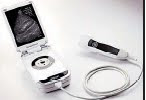 away from a hospital — like at home or on military operations,“Telegraph”reported”.
medics claim, would help speed up diagnosis for emergency patients has been
launched in Europe and North America
The developer of the 5,000 pounds machine, G E Healthcare, says it is not designed as an alternative to traditional scanners but to offer a fast diagnosis and enable early treatment under emergency conditions.
The Vscan device can be used to take images of the heart and other parts of the body of the patients, who are

Thursday, February 18, 2010
Viewing the Mouse Tracks
If you’ve ever wondered about the flow of your mouse around your computer screen, a free downloadable application, called “mouse pointer track,” can help you follow these esoteric movements and turn them into a fascinating blur between art and information.
The simple application was developed by Anatoly Zenkov, a Russian graphic designer and programmer, and has been downloaded tens of thousands of times since he first released it in late January this year.
The software runs on any Macintosh or Windows computer and tracks every movement and click of your mouse.
Mr. Zenkov explained in an interview that the project began as a simple attempt to create something visually interesting with computer code. “It was just for fun,” Mr. Zenkov said. “It was meant to be an experiment for me, and then I saw the interest from so many other people, so I decided to share it for free on the Internet.”
As you can see from the images on Mr. Zenkov’s Flickr page, he has been tracking different mouse movements in different application settings.
The images at the top and bottom of this post were made by tracking my mouse movements for 30 minutes, during which time I was writing this blog post and surfing the Web.
The simple application was developed by Anatoly Zenkov, a Russian graphic designer and programmer, and has been downloaded tens of thousands of times since he first released it in late January this year.
The software runs on any Macintosh or Windows computer and tracks every movement and click of your mouse.
Mr. Zenkov explained in an interview that the project began as a simple attempt to create something visually interesting with computer code. “It was just for fun,” Mr. Zenkov said. “It was meant to be an experiment for me, and then I saw the interest from so many other people, so I decided to share it for free on the Internet.”
As you can see from the images on Mr. Zenkov’s Flickr page, he has been tracking different mouse movements in different application settings.
The images at the top and bottom of this post were made by tracking my mouse movements for 30 minutes, during which time I was writing this blog post and surfing the Web.
Wednesday, February 17, 2010
Microsoft Outlook to Facebook and MySpace Integration
Microsoft Outlook has become a lot more social through new partnerships with Facebook and MySpace and an existing one with LinkedIn.
Microsoft announced Outlook Social Connector, a new Office 2010 feature that hooks up social feeds into the Outlook inbox. The initial partner for the program was LinkedIn whose business connections, alerts, and messages would integrate directly with Outlook.
Now that integration has gone live.
Outlook users can now download LinkedIn for Outlook and transform their desktop inboxes into their hub for all things LinkedIn.
Microsoft announced Outlook Social Connector, a new Office 2010 feature that hooks up social feeds into the Outlook inbox. The initial partner for the program was LinkedIn whose business connections, alerts, and messages would integrate directly with Outlook.
Now that integration has gone live.
Outlook users can now download LinkedIn for Outlook and transform their desktop inboxes into their hub for all things LinkedIn.
Symbian Operating Systems Takes the Open Road
The most popular smartphone operating system, Symbian, announced a move towards open source in 2008, and has now completed the task. This means that anyone will be able to modify the Symbian source code, develop it, and use it for any purpose. What will be the impact of this bold move? The Symbian Foundation believes it will attract new developers to work on the system and help speed up the pace of improvement. It will increase both the speed of evolution, and the rate of innovation of the platform.
Symbian may be the world’s most popular smart phone operating system, but it has been losing the publicity battle, with Google’s Android operating system and Apple’s iPhone dominating recent headlines. So was this a marketing move to capture mindshare? Read BBC article titled Symbian phone operating system goes open source to find out.
Symbian may be the world’s most popular smart phone operating system, but it has been losing the publicity battle, with Google’s Android operating system and Apple’s iPhone dominating recent headlines. So was this a marketing move to capture mindshare? Read BBC article titled Symbian phone operating system goes open source to find out.
Monday, February 15, 2010
Ten Tips For Staying Safe On Facebook
1. Think about who you add It's not all about the numbers of friends. Remember when you accept a friend request you provide your new friend with access to lots of information about you. This includes, posts, photographs, messages and all the background information that you write about yourself. You can delete friends at any time, so perhaps it's time to refresh your list and think about who you really want accessing your information.
2. Check your settings Recently, Facebook changed the default privacy setting to share information publicly. It's worth spending some time to go through your settings and adjust where necessary; you may be sharing more than you intended. You even have the option to add 'limited profiles' for those people that you may not want accessing your personal information. It's up to you how you want to use these settings so it's definitely worth having a look to create a profile that's right for you!
3. Why are you on Facebook? Ask yourself what you want to achieve with your profile. Is it just to share photos, or keep in touch with people, or even to share links and updates of your activities? Sometimes it's better to cut down what you show on your profile; this includes signing up to applications which also take a lot of your data. You can always add or remove options as you go, so if your needs change, so should your profile.
4. Be smart about your password Try not to use the same passwords on all of your accounts. It's also important to be mindful of where you are sending your updates and the types of security questions you set.
5. Be aware of where you sign in from Check that the computer that you sign in from doesn't store your email address and password. It seems simple but often it's easy to accidentally choose it to 'remember you'. Make sure you have the appropriate privacy settings on your browser.
6. Be careful what you say Make sure that what you say in status updates and comments is something that you would be comfortable seeing on the front page of a newspaper. Once you post it, anyone that sees it can copy and post it elsewhere, or take action based on it. Do you really want everyone to know that you will be all alone at home tonight or away next week?
7. Watch out for Phishing Attacks Over the past year, there have been many attempts to get users to give up their login and passwords by tricking them with fake emails from Facebook. Never select any email links asking you to click to reset your password. Always go directly to Facebook - if there is a problem, Facebook will notify you on site. Installing and using an up-to-date complete protection solution on your PC, like AVG Internet Security, will also safeguard you against spam and phishing attacks.
8. Take immediate action If friends start receiving spam from you or status updates appear that you didn't make, your account may have been compromised. If you think this has happened, immediately change your password. If you can't log in to your account, go to the Help link at the bottom of any Facebook page and click on Security to notify Facebook about your account.
9. Protect your mobile device. Be mindful about who might have access to your mobile phone. Many phones today have apps that connect you into many social networking sites such as Facebook. Therefore, if you use these apps, make sure you log out of them when you are no longer using them.
10. Monitor suspicious activity Watch out for suspicious activity on your Wall, News Feed and Facebook Inbox. Never, ever click on suspicious links. They can often look enticing, e.g. "Hey come look at my charity cycling pictures on my site." Before you click, look closely! Does the site look authentic? If in doubt, don't click on it.
2. Check your settings Recently, Facebook changed the default privacy setting to share information publicly. It's worth spending some time to go through your settings and adjust where necessary; you may be sharing more than you intended. You even have the option to add 'limited profiles' for those people that you may not want accessing your personal information. It's up to you how you want to use these settings so it's definitely worth having a look to create a profile that's right for you!
3. Why are you on Facebook? Ask yourself what you want to achieve with your profile. Is it just to share photos, or keep in touch with people, or even to share links and updates of your activities? Sometimes it's better to cut down what you show on your profile; this includes signing up to applications which also take a lot of your data. You can always add or remove options as you go, so if your needs change, so should your profile.
4. Be smart about your password Try not to use the same passwords on all of your accounts. It's also important to be mindful of where you are sending your updates and the types of security questions you set.
5. Be aware of where you sign in from Check that the computer that you sign in from doesn't store your email address and password. It seems simple but often it's easy to accidentally choose it to 'remember you'. Make sure you have the appropriate privacy settings on your browser.
6. Be careful what you say Make sure that what you say in status updates and comments is something that you would be comfortable seeing on the front page of a newspaper. Once you post it, anyone that sees it can copy and post it elsewhere, or take action based on it. Do you really want everyone to know that you will be all alone at home tonight or away next week?
7. Watch out for Phishing Attacks Over the past year, there have been many attempts to get users to give up their login and passwords by tricking them with fake emails from Facebook. Never select any email links asking you to click to reset your password. Always go directly to Facebook - if there is a problem, Facebook will notify you on site. Installing and using an up-to-date complete protection solution on your PC, like AVG Internet Security, will also safeguard you against spam and phishing attacks.
8. Take immediate action If friends start receiving spam from you or status updates appear that you didn't make, your account may have been compromised. If you think this has happened, immediately change your password. If you can't log in to your account, go to the Help link at the bottom of any Facebook page and click on Security to notify Facebook about your account.
9. Protect your mobile device. Be mindful about who might have access to your mobile phone. Many phones today have apps that connect you into many social networking sites such as Facebook. Therefore, if you use these apps, make sure you log out of them when you are no longer using them.
10. Monitor suspicious activity Watch out for suspicious activity on your Wall, News Feed and Facebook Inbox. Never, ever click on suspicious links. They can often look enticing, e.g. "Hey come look at my charity cycling pictures on my site." Before you click, look closely! Does the site look authentic? If in doubt, don't click on it.
Thursday, February 11, 2010
Google's EMail as WebFinger
Google enabled the next generation of the UNIX like finger command - WebFinger - for all Gmail accounts. WebFinger provides users with a standardized and decentralized way of sharing their profile and identity information online
Google announced that the company has now enabled WebFinger fall all Google accounts with public profiles.
Making Your Email Address More Useful
You can think of WebFinger as an email-centric cousin of OpenID. While OpenID associates your identity with a URL, WebFinger links your identity to your email address. WebFinger can store metadata about your account and make it publicly accessible. This data can include your public profile data, information about other services that are used by this email address, a URL to your avatar, or - if you choose so - a declaration that this address doesn't have any metadata associated with it. The WebFinger metadata can also point to an alternative identity provider, which can be an OpenID server.
Currently, there are not a lot of user-facing projects that expose this data, but you can find a small demo service written by Google engineer DeWitt Clinton here.
Adding Value to Google Profiles
With Buzz, Google already put a lot of emphasis on Google Profiles and today's announcement increases the value of these profiles even more. It's important to note, though, that WebFinger is an open and free protocol, so any email service and identity provider can implement it. You can find more detailed information about the WebFinger protocol here.
Google announced that the company has now enabled WebFinger fall all Google accounts with public profiles.
Making Your Email Address More Useful
You can think of WebFinger as an email-centric cousin of OpenID. While OpenID associates your identity with a URL, WebFinger links your identity to your email address. WebFinger can store metadata about your account and make it publicly accessible. This data can include your public profile data, information about other services that are used by this email address, a URL to your avatar, or - if you choose so - a declaration that this address doesn't have any metadata associated with it. The WebFinger metadata can also point to an alternative identity provider, which can be an OpenID server.
Currently, there are not a lot of user-facing projects that expose this data, but you can find a small demo service written by Google engineer DeWitt Clinton here.
Adding Value to Google Profiles
With Buzz, Google already put a lot of emphasis on Google Profiles and today's announcement increases the value of these profiles even more. It's important to note, though, that WebFinger is an open and free protocol, so any email service and identity provider can implement it. You can find more detailed information about the WebFinger protocol here.
Wednesday, February 10, 2010
How to find IMEI number of mobile phone
IMEI stands for “The International Mobile Equipment Identity”. It is a unique identification number of every mobile phone. It helps mobile companies identify valid subscribers and the type of mobile phone equipment being used. Incase of mobile phone theft or lose, you can request mobile company to disable specific IMEI number to prevent use of stolen phone.
Check phone IMEI number using command
1. Turn ON your mobile phone.
2. Make sure you are on Home screen.
3. Type *#06# and press OK / call button.
4. Your phone IMEI number will show as “Serial Number:XXX”. Here XXX is 15-17 digit number which is unique for every mobile phone.
Check IMEI number from battery
1. Turn OFF mobile phone.
2. Open the case and remove the battery.
3. Check for white sticker or label. It should have 15-17 digit IMEI number of your mobile phone.
Make sure you note down mobile phone IMEI number in safe place. Later it can be used to track, find or block stolen mobile phone (just in case).
Check phone IMEI number using command
1. Turn ON your mobile phone.
2. Make sure you are on Home screen.
3. Type *#06# and press OK / call button.
4. Your phone IMEI number will show as “Serial Number:XXX”. Here XXX is 15-17 digit number which is unique for every mobile phone.
Check IMEI number from battery
1. Turn OFF mobile phone.
2. Open the case and remove the battery.
3. Check for white sticker or label. It should have 15-17 digit IMEI number of your mobile phone.
Make sure you note down mobile phone IMEI number in safe place. Later it can be used to track, find or block stolen mobile phone (just in case).
Tuesday, February 9, 2010
Google Buzz in Gmail
GMail is launching Google Buzz, a new way to start conversations about the things you find interesting and share updates, photos, videos and more. Buzz is built right into Gmail, so there's nothing to set up — you're automatically following the people you email and chat with the most.
GMail is making the sharing experience really rich by integrating photos, videos, and links. No more fuzzy little pictures: Buzz makes it easy to quickly flip through photos and experience them the way they were meant to be seen: big and full-resolution. And videos play inline so you can watch them without opening a new window.
You can choose to share publicly with the world or privately to a small group of friends each time you post. And you can connect other sites you use, today there's Picasa, Flickr, Google Reader, and Twitter, so your friends can keep up with what you're doing around the web — all in one place.
To make sure you don't miss out on the best part of sharing, Buzz sends responses to your posts straight to your inbox. Unlike static email messages, buzz messages in your inbox are live conversations where comments appear in real time.
You can follow the specific people whose posts you want to see, but Buzz also recommends posts from people you're not directly following, often ones where your friends are having a lively conversation in the comments. If you're not interested in a particular recommendation, just click the "Not interested" link and your feedback will help improve the recommendations system. Buzz also weeds out uninteresting posts from the people you follow — collapsing inactive posts and short status messages like "brb." These early versions of ranking and recommendations are just a start; we're working on improvements that will help you automatically sort through all the social data being produced to find the most relevant conversations that matter to you.
Source: Google Buzz
GMail is making the sharing experience really rich by integrating photos, videos, and links. No more fuzzy little pictures: Buzz makes it easy to quickly flip through photos and experience them the way they were meant to be seen: big and full-resolution. And videos play inline so you can watch them without opening a new window.
You can choose to share publicly with the world or privately to a small group of friends each time you post. And you can connect other sites you use, today there's Picasa, Flickr, Google Reader, and Twitter, so your friends can keep up with what you're doing around the web — all in one place.
To make sure you don't miss out on the best part of sharing, Buzz sends responses to your posts straight to your inbox. Unlike static email messages, buzz messages in your inbox are live conversations where comments appear in real time.
You can follow the specific people whose posts you want to see, but Buzz also recommends posts from people you're not directly following, often ones where your friends are having a lively conversation in the comments. If you're not interested in a particular recommendation, just click the "Not interested" link and your feedback will help improve the recommendations system. Buzz also weeds out uninteresting posts from the people you follow — collapsing inactive posts and short status messages like "brb." These early versions of ranking and recommendations are just a start; we're working on improvements that will help you automatically sort through all the social data being produced to find the most relevant conversations that matter to you.
Source: Google Buzz
Monday, February 8, 2010
Aardvark - Social Search Engine
Aardvark is working on creating social search engines. As of October 2009, Aardvark had about 90,000 users.
Social search aims to connect people with questions to people who can answer those questions.
The idea has gained momentum with the increased use of Twitter and Facebook, where people rely on their networks for information, blasting queries to their social networks and, if their networks are good enough, getting useful, personalized responses. Some people who think social search has the potential to go beyond Google and fundamentally change the way people use the Internet.
Aardvark uses various factors to identify who it thinks are the best people to answer a question, then poses the question to them. Among the things it tries to determine are the expertise a potential answerer has about a subject, how closely connected the two people are, and how quickly the answerer is available.
On Aardvark, it only has to pair you with a person who knows about the topic — it doesn’t have to worry about actually finding the answer, and can be more flexible with how the query is worded.”
But there are also some significant shortcomings to Aardvark’s approach. Getting answers through social search requires someone else to do something, so it cannot produce the instant gratification that comes from typing something into a Web search box and watching a page of results appear. For Aardvark to be successful, it needs to enlist the participation of competent answerers. (Aardvark says that more than half of the questions posed received an answer within 10 minutes.)
There is also the question of whether or not to trust the answer one gets through a social search. How do you know if the person who answered your question is qualified to answer?
According to Aardvark’s report, the most common questions being asked are restaurants and bar recommendations, product reviews and help, local services and travel. And, as with all new buzzy technologies, a sizable chunk of the questions people are asking are about Aardvark itself.
Source: nytimes
Social search aims to connect people with questions to people who can answer those questions.
The idea has gained momentum with the increased use of Twitter and Facebook, where people rely on their networks for information, blasting queries to their social networks and, if their networks are good enough, getting useful, personalized responses. Some people who think social search has the potential to go beyond Google and fundamentally change the way people use the Internet.
Aardvark uses various factors to identify who it thinks are the best people to answer a question, then poses the question to them. Among the things it tries to determine are the expertise a potential answerer has about a subject, how closely connected the two people are, and how quickly the answerer is available.
On Aardvark, it only has to pair you with a person who knows about the topic — it doesn’t have to worry about actually finding the answer, and can be more flexible with how the query is worded.”
But there are also some significant shortcomings to Aardvark’s approach. Getting answers through social search requires someone else to do something, so it cannot produce the instant gratification that comes from typing something into a Web search box and watching a page of results appear. For Aardvark to be successful, it needs to enlist the participation of competent answerers. (Aardvark says that more than half of the questions posed received an answer within 10 minutes.)
There is also the question of whether or not to trust the answer one gets through a social search. How do you know if the person who answered your question is qualified to answer?
According to Aardvark’s report, the most common questions being asked are restaurants and bar recommendations, product reviews and help, local services and travel. And, as with all new buzzy technologies, a sizable chunk of the questions people are asking are about Aardvark itself.
Source: nytimes
Friday, February 5, 2010
Ritmo: iPod for Babies
The Ritmo Advanced Sound System by Nuvo is the most advanced and complete prenatal music player, delivering quality and safe sound to the tiniest listeners.
Ritmo allows you and your baby to share the sensory and emotional experience of bonding through sound and music, while being supportive, safe, and stylish at the same time. Reactive listening begins at 17 weeks, so choose classical music for the calming Mozart Effect, the classic rock of The Beatles, or the upbeat show tunes of Broadway. Any type of audio you can listen to on your iPod/MP3's earphones can be enjoyed by your baby at the same time.
Ritmo allows you and your baby to share the sensory and emotional experience of bonding through sound and music, while being supportive, safe, and stylish at the same time. Reactive listening begins at 17 weeks, so choose classical music for the calming Mozart Effect, the classic rock of The Beatles, or the upbeat show tunes of Broadway. Any type of audio you can listen to on your iPod/MP3's earphones can be enjoyed by your baby at the same time.
Thursday, February 4, 2010
Facebook's most recent navigation updates
Top Menu
In the top menu, you will find your newest notifications, requests and messages.
The Home and Profile links can now be found in the top-right corner along with your Account menu, which includes your privacy settings and the ability to log out.

Left Menu
The left menu has been organized to make it easier for you to communicate with and discover content from your friends. You can now access your messages and other core features all in one place, to the left of your News Feed.
FaceBook also made Chat more prominent by showing you a list of some of your online friends in the left-hand menu. This list is not comprehensive, but includes people who you communicate with frequently. To see a list of all of your online friends, you can open the Chat bar in the bottom right-hand corner or click "See All" at the bottom of your left-hand menu.
Games and Applications
Facebook making it easier for you to find and interact with applications and discover new ones, with the new Applications and Games dashboards, accessible via the "Applications" and "Games" links on the home page. The dashboards will surface the applications you've interacted with most recently as well as your most recent application activity and your friends' activity.
Source: Facebook Blog
In the top menu, you will find your newest notifications, requests and messages.
The Home and Profile links can now be found in the top-right corner along with your Account menu, which includes your privacy settings and the ability to log out.

Left Menu
The left menu has been organized to make it easier for you to communicate with and discover content from your friends. You can now access your messages and other core features all in one place, to the left of your News Feed.
FaceBook also made Chat more prominent by showing you a list of some of your online friends in the left-hand menu. This list is not comprehensive, but includes people who you communicate with frequently. To see a list of all of your online friends, you can open the Chat bar in the bottom right-hand corner or click "See All" at the bottom of your left-hand menu.
Games and Applications
Facebook making it easier for you to find and interact with applications and discover new ones, with the new Applications and Games dashboards, accessible via the "Applications" and "Games" links on the home page. The dashboards will surface the applications you've interacted with most recently as well as your most recent application activity and your friends' activity.
Source: Facebook Blog
Wednesday, February 3, 2010
Think Draw
Think Draw is the home of an artistic community but anyone is invited to create quirky masterpieces.
Drag and drop pre-made shapes onto the drawing board to create pieces such as this amazing portrait made out of fruit, or this one with animals.
Take a Look!
Drag and drop pre-made shapes onto the drawing board to create pieces such as this amazing portrait made out of fruit, or this one with animals.
Take a Look!
Subscribe to:
Posts (Atom)